You add reverb to your vocals, and they sound great soloed.
Then you play the full mix, and the vocal is suddenly washed out, sitting behind the instruments in a cloud of mush.
So you pull the reverb back until it disappears, and now the vocal sounds dry and disconnected, like it was glued on after the fact.
Somewhere between drowned and bone-dry is the sweet spot, and the right settings get you there.
Reverb is the effect that places a vocal in a space, and the type, pre-delay, decay, and EQ decide whether it adds depth and polish or buries the performance.
Here are the best reverb settings for vocals.
You get a genre cheat sheet to dial in fast, a guide to choosing the right type, and the pro techniques that make a vocal sound expensive.
TL;DR
- Use reverb on an aux send, not an insert, so you can process the wet and dry signals separately.
- Pre-delay of 10 ms to 40 ms lets the dry vocal cut through before the reverb blooms.
- Match decay to the tempo: shorter for fast or busy songs, longer for ballads.
- Plate is the everyday vocal reverb; a hall for ballads, a room for subtle realism.
- EQ the reverb return (high-pass around 300 Hz to 600 Hz, low-pass around 8 kHz to 10 kHz) to kill mud and harshness.
- When in doubt, back the reverb off 10 to 25 percent. It is almost always too loud.
Below: how to set it up, the settings that matter, the genre cheat sheet, and the pro moves for depth and width.
When to Use Reverb on Vocals
Reverb is not mandatory, and the first decision is what you actually want it to do.
Depth, glue, mood, or a special effect all call for different amounts and types, so deciding the intent before you load a preset saves you from drowning the vocal by default.
Think about how you want the vocal to feel rather than just how the reverb sounds in isolation.
A dense, fast arrangement often wants very little reverb, and modern pop and rap frequently keep the lead surprisingly dry, leaning on delay for depth instead.
If the vocal has no room to sit in the first place, making space for vocals in a mix is the step that comes before any of this.
A sparse ballad or a rock lead, on the other hand, can take a lush, obvious wash.
Ask what the vocal needs, to sit further back, to feel bigger, or to feel like it is in a real room, and let that choice drive every setting that follows.
Insert vs Aux: The Right Routing
Before you touch a single setting, set the reverb up the right way.
Pros almost always run vocal reverb on an auxiliary send rather than as an insert directly on the track.
The send approach keeps the wet reverb signal on its own channel. This gives you separate control over the dry vocal and its space.
It lets several vocals share one reverb and means you can EQ and compress the reverb without touching the dry voice.
- Create an aux or return track and load the reverb on it.
- Set the reverb to 100 percent wet, since the dry vocal already lives on its own track.
- Send the vocal to the aux and raise the send until the space feels right in the mix.
- Insert an EQ after the reverb on the return so you can shape the tail.
The Settings That Actually Matter
A reverb plugin has a lot of knobs, but only a handful truly shape how a vocal sits. Get these right, and the rest is fine-tuning.
The two most important are pre-delay and decay, because together they control how far back the vocal sits and how long the space rings.
- Pre-delay (10 ms to 40 ms): the gap before the reverb starts. A longer pre-delay keeps the dry vocal upfront and intelligible while still adding space. Around 0 ms to 10 ms feels like a tiny room, 10 ms to 20 ms a larger space, and 20 ms and up reaches into halls.
- Decay (0.5 s to 3 s): how long the tail rings. Short decays keep things tight and clear; long decays sound lush and ethereal but smear fast vocals.
- Size: the perceived dimensions of the space. Pair it sensibly with decay so a small room does not ring for three seconds.
- Mix / send level: how much reverb you hear. Set it in the full mix, not in solo, and err on the subtle side.
These settings interact, so do not set them in isolation.
A long decay with no pre-delay smears the words; the same decay with 30 ms of pre-delay can sound spacious and still clear.
Likewise, a high send level is fine with a short, tightly EQ’d reverb but turns to mush with a long hall.
Adjust them as a group, always listening to how the vocal sits against the track.
Best Vocal Reverb Settings by Genre
These are starting points, not rules, but they get you in the right ballpark fast. Dial in the row that matches your track, then trust your ears and adjust to the song.
The mix column assumes a send level, so treat it as a feel rather than an exact number.
To adapt a row, let the tempo and density of your arrangement guide you.
Faster and busier means shorter decay and less reverb, slower and sparser means longer decay and a more obvious tail.
The reverb type is a starting suggestion too, not a rule, so swap a plate for a hall if the song wants more space.
| Style | Reverb type | Pre-delay | Decay | Amount |
|---|---|---|---|---|
| Pop | Plate | 20–40 ms | 1–1.5 s | Subtle |
| Ballad | Hall / chamber | 30–50 ms | 2–3 s | Lush |
| Rock | Plate / room | 10–30 ms | 0.8–1.5 s | Moderate |
| Rap / hip-hop | Plate / room | 10–30 ms | 0.5–1 s | Tight, low |
| R&B | Plate / hall | 20–40 ms | 1–2 s | Smooth |
| EDM / electronic | Hall / plate | Tempo-synced | Tempo-synced | Wide |
How to Choose the Right Type
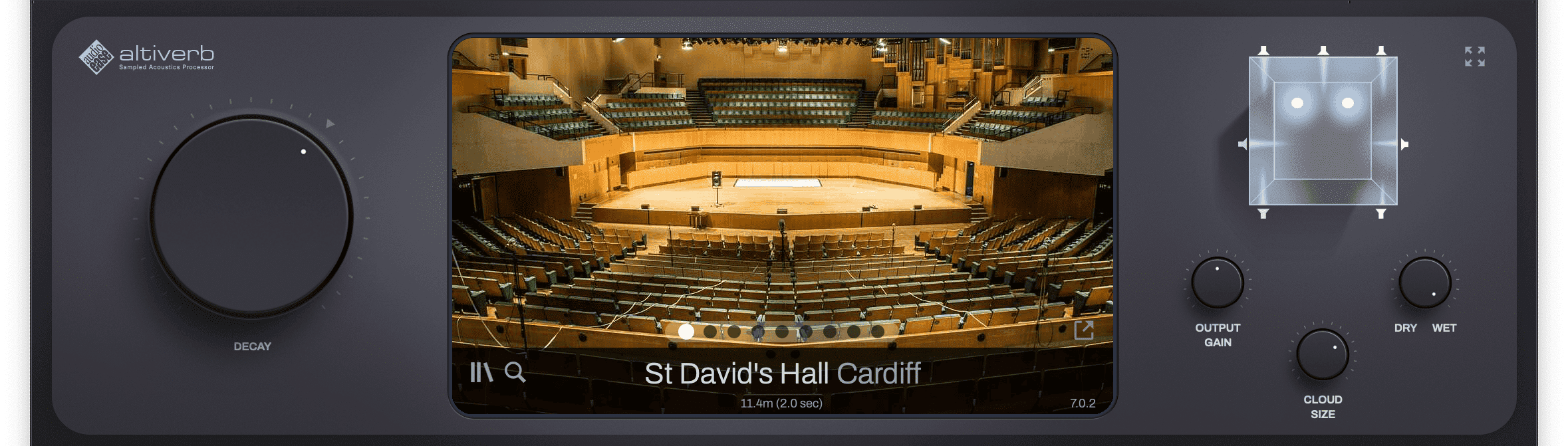
The reverb type sets the character before you adjust anything.
Each one has a distinct personality, and matching it to the vocal and genre does half the work.
Plate is the workhorse for lead vocals, but the others each have their place.
Match the type to the vocal you already have. A bright, airy voice often pairs well with a warmer chamber or room so the reverb does not push it further into harshness.
A dark or intimate voice can take a brighter plate to open it up. The type should complement the tone, not fight it.
| Type | Character | Best for |
|---|---|---|
| Plate | Bright, smooth, dense | The everyday lead-vocal reverb |
| Hall | Big, lush, long tail | Ballads and spacious, ethereal vocals |
| Room | Small, natural, intimate | Subtle realism and glue |
| Chamber | Warm, dense, controlled | Vintage warmth without the wash |
| Spring | Boingy, retro, characterful | An effect or genre vibe like dub and surf |
The plugin you use matters too, since a great algorithm sounds smoother and more three-dimensional than a basic one.
If you are choosing a tool, our roundup of the best reverb plugins for vocals covers the top options for each type.
Match the Decay to the Tempo
One trick instantly makes reverb sit better: match the decay time to the tempo.
When the tail dies away in time with the song, it blends in rhythmically instead of smearing across the beat.
It is the difference between reverb that feels like part of the track and reverb that feels bolted on.
The math is simple. At 120 BPM, a quarter note is 500 ms and a half note is 1,000 ms, so setting your decay near one of those values keeps the reverb in time.
Many reverb plugins have a tempo-sync option that does this for you. Use a shorter note value on fast, busy songs and a longer one on slow, sparse ballads.
You can sync pre-delay to the tempo the same way, setting it to a small note value like a 1/16 or 1/32 so the reverb blooms in rhythm with the performance.
EQ the Return to Kill Mud (the Abbey Road Trick)
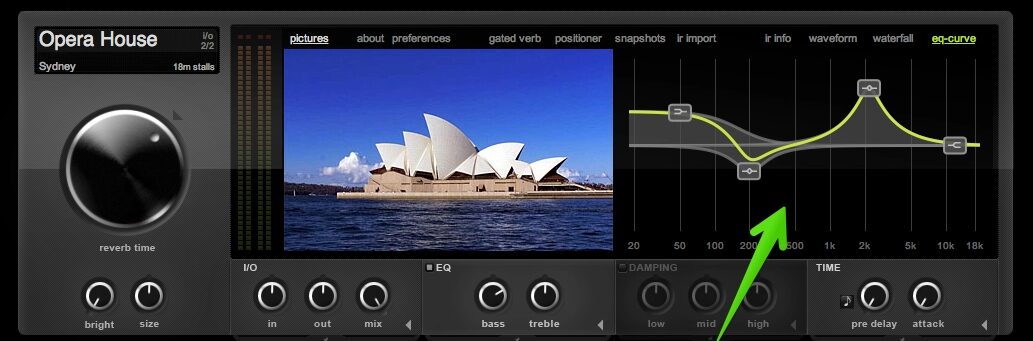
The single biggest reason reverb muddies a mix is that it carries the same low-mid buildup and harsh highs as the dry vocal, multiplied across the whole tail.
The fix is to EQ the reverb return, not just the vocal.
A clean dry vocal helps too, and how to EQ vocals like a pro covers the boosts and cuts that get you there.
This is where the famous Abbey Road reverb trick comes from.
Insert an EQ after the reverb on the aux and high-pass the low end out, then low-pass the harsh top.
Abbey Road engineers famously started around 600 Hz on the high-pass and 10 kHz on the low-pass, and that remains a great starting point.
A high pass anywhere from 300 Hz to 600 Hz clears the mud. A low pass around 8 kHz to 10 kHz keeps the tail from hissing and stops it from fighting the dry vocal’s air.
The result is a reverb you feel more than hear.
You can push the high-pass higher on a busy mix to keep the low mids clean or relax it on a sparse ballad where the fuller tail adds warmth.
A touch of dynamic EQ on the return can also duck the harsh frequencies only when the tail gets loud.
Pro Techniques for Depth and Width
Once the basics are solid, a few techniques separate a flat, generic reverb from a deep, professional vocal space.
These are the moves top mixers reach for to add dimension without washing the vocal out.
Combine Reverb and Delay
Pairing a short reverb with a tempo-synced delay creates depth that reverb alone cannot.
The delay provides rhythmic repeats that push the vocal back in space, while a light reverb glues it all together.
Because delay is more transparent than reverb, you get a sense of distance without the mud, which is why so many modern vocals lean on delay first and reverb second.
Layer Multiple Reverbs
Top mixers rarely rely on a single reverb. Blending two or more gives a richer, more believable space than any one can on its own.
A short room or plate adds intimacy and glues close to the vocal, while a longer hall adds depth and size behind it.
EQ each one and keep them subtle, and let the short reverb sit a touch louder than the long one so the vocal stays present rather than distant.
Use Plate Reverb for Width
A bright stereo plate is the classic way to widen and lift a lead vocal.
Its dense, smooth tail spreads the voice across the stereo field and adds a polished sheen without the long wash of a hall.
If you want to understand why it works so well on vocals, see our breakdown of plate reverb.
Automate Reverb for Contrast
Reverb does not have to stay constant.
Automating the send level, or even the decay, adds movement and contrast between sections.
Keep the verse dry and intimate, then open the reverb up into the chorus for a bigger, more emotional sound.
A reverb throw on the last word of a phrase is another classic move that adds drama exactly where you want it.
Duck the Reverb for Clarity
To keep a vocal upfront while still using plenty of reverb, sidechain the reverb return to the dry vocal.
The reverb ducks down while the singer is actually singing, then swells back in the gaps between phrases.
The vocal stays clear and present, and the space only becomes obvious when it will not get in the way.
Ducking works best on a vocal whose own dynamics are already controlled, which is the job of vocal compression.
3 Common Mistakes
Most reverb problems come down to a few repeat offenders. Avoid these and your vocals will sit in a clean, controlled space.
1. Too much reverb. It is the most common mistake by far. Set the level in the full mix, then back it off until you almost miss it.
Reverb you barely notice is usually the right amount.
2. No pre-delay. With the reverb starting instantly, the dry vocal and its tail blur together, and the words lose clarity.
A little pre-delay keeps the voice upfront while the space sits behind it.
3. Not EQing the return. Unfiltered reverb piles low-mid mud and harsh highs onto the mix.
High-pass and low-pass the tail, as in the Abbey Road trick, and the same amount of reverb suddenly sounds clean.
Frequently Asked Questions
Six quick answers to the reverb decisions that stall a vocal most often: type, level, routing, and mud.
What are the best reverb settings for vocals?
For most vocals, start with a plate reverb on an aux send, a pre-delay of 20 ms to 40 ms, and a decay of around 1 to 1.5 seconds.
Then match the decay to the tempo.
High-pass the reverb return around 300 Hz to 600 Hz and low-pass it around 8 kHz to 10 kHz. Keep the amount subtle and set it in the full mix.
Use the genre cheat sheet above as your starting point.
Should vocal reverb be on an insert or an aux send?
An aux send is almost always better. It keeps the wet reverb on its own channel.
From there you can EQ and compress the tail without touching the dry vocal, blend the space precisely, and share one reverb across several vocals.
Set the reverb to 100 percent wet on the aux and control the amount with the send level.
How much reverb should you use on vocals?
Less than you think. Set the level while the full mix is playing, not in solo, then back it off by 10 to 25 percent.
Reverb almost always sounds too loud in isolation.
A good test is to mute the reverb and bring it up only until you notice the vocal feels flat without it, then stop there.
What is the best type of reverb for vocals?
Plate reverb is the most popular and versatile choice for lead vocals, thanks to its bright, smooth, dense character.
Hall reverb suits ballads and big, ethereal vocals, room reverb adds subtle natural realism, and chamber offers vintage warmth.
Plate is the safe default; choose another type when the song calls for a specific mood.
Should you EQ vocal reverb?
Yes, almost always. EQing the reverb return is the single most effective way to keep it from muddying the mix.
High-pass the low end around 300 Hz to 600 Hz and low-pass the harsh top around 8 kHz to 10 kHz.
This Abbey Road trick lets you use more reverb for depth while keeping the mix clean and the vocal clear.
How do you stop reverb from muddying the vocal?
Three moves fix almost all reverb mud.
EQ the reverb return with a high-pass and low-pass, add pre-delay so the dry vocal stays upfront, and keep the overall amount subtle.
For extra clarity, sidechain the reverb to the dry vocal so it ducks while the singer is singing and only swells in the gaps.
The Bottom Line
Great vocal reverb is mostly about restraint and setup.
Run it on an aux, choose the right type, add pre-delay so the words stay clear, match the decay to the tempo, and EQ the return to kill mud.
Then use the techniques (reverb plus delay, automation, ducking) to add depth and width without washing the vocal out.
Set it in the full mix, back it off until you nearly miss it, and the space will sound finished rather than foggy.
Reverb is the final coat of polish on a vocal, and it only lands when the stages before it are handled.
The complete vocal mixing guide covers those earlier stages and where the space fits at the end.